CHAPTER 5
Bugs & Debugging Methods
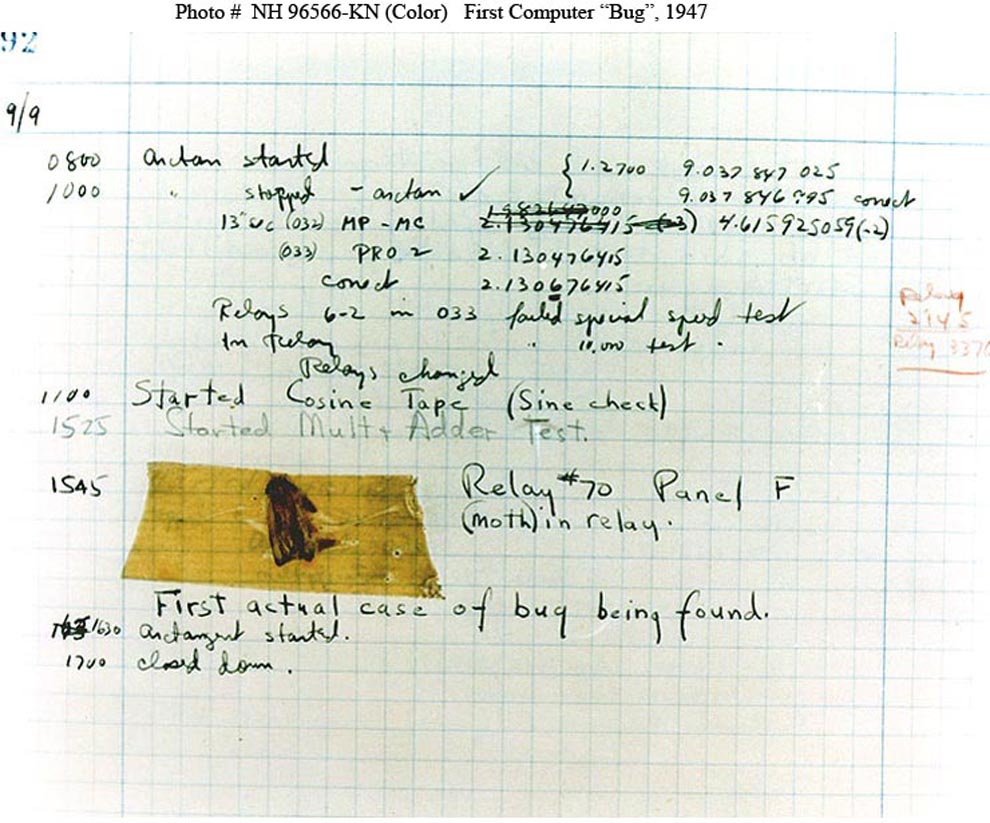
The Origin of the Term 'Bug' The history of software bugs begins with a fascinating anecdote dating back to the early days of computers. The term 'bug' was popularized in the field of computing by a peculiar incident involving the Harvard Mark II computer in 1947. Grace Hopper, a pioneering computer scientist, discovered that a malfunction in the system was caused by an actual moth trapped in a relay. This incident was humorously referred to as the "first actual case of bug being found," and the term 'bug' soon became synonymous with software errors or glitches.
Early Bugs and Their Impact In the early days of computing, bugs were often hardware-related, like short circuits caused by environmental factors, or mechanical failures. As technology evolved, software became more complex, and the nature of bugs changed. Programmers began encountering logical errors, incorrect calculations, and unforeseen interactions within the code. These software bugs could have significant impacts, ranging from minor inconveniences to major system failures, sometimes with serious real-world consequences.
Modern Software Bugs Today, software bugs are a common aspect of the digital landscape. The complexity of modern software systems, the interdependencies of various components, and the rapid pace of technological advancement all contribute to the prevalence of bugs. Software is now an integral part of daily life, powering everything from mobile devices to critical infrastructure systems, making the impact of bugs more far-reaching than ever.
Causes of Software Bugs Software bugs can arise from various sources, including:
1. Coding Errors: Simple mistakes in code, such as syntax errors or logic mistakes.
2. Design Flaws: Errors in the software's architecture or underlying design.
3. Requirement Misunderstandings: Misinterpretations or changes in software requirements.
4. Hardware Limitations: Constraints or failures in the hardware running the software.
5. External Interactions: Unforeseen interactions with other systems or software.
6. User Input Errors: Unanticipated or incorrect inputs from users.
7. Environment Changes Changes in the operating environment, including updates or modifications.
Seven Methods of Debugging
Over the years, programmers have developed various debugging methods to identify and resolve bugs:
1. Code Review: Examining source code manually or with automated tools to find errors.
2. Testing: Using a variety of testing methods (unit, integration, system, etc.) to uncover bugs.
3. Debugging Tools: Utilizing specialized software tools to inspect and debug code.
4. Logging and Monitoring: Implementing logging systems to track the software’s operation and identify issues.
5. Pair Programming: Collaborating with another programmer to review and write code.
6. Post-Mortem Analysis: Analyzing bugs after they occur to understand their cause and prevent future occurrences.
7. Beta Testing: Releasing the software to a limited audience to identify real-world bugs.
Seven Prompts to Debug Using ChatGPT:
1. Checking for Typos ○ Explanation: Sometimes, errors in code are just simple typing mistakes. Always check your code for any misspelled words or missing symbols. ○ Prompt: "I have written some code and it's not working. Can you help me check for any typos or simple mistakes? Here's my code: [insert code]." 2. Understanding Error Messages ○ Explanation: Error messages try to tell you what's wrong. Read them carefully to get clues about the issue. ○ Prompt: "I got this error message when I ran my code: [insert error message]. What does it mean, and what should I look for in my code to fix it?" 3. Adding Print Statements ○ Explanation: You can use print statements in your code to show what's happening at different points. This can help you find where things go wrong. ○ Prompt: "Can you show me where to add print statements in my code to figure out where it starts having problems? Here's my code: [insert code]."
4. Checking the Order of Code ○ Explanation: The order in which your code runs is important. Sometimes errors happen because things are not happening in the right order. ○ Prompt: "I think my code might be doing things in the wrong order. Can you help me check the sequence of my code? Here it is: [insert code]." 5. Simplifying Complex Parts ○ Explanation: If a part of your code is very complicated, try breaking it down into simpler, smaller parts. It's easier to find errors in smaller, simpler code. ○ Prompt: "There's a complex part of my code that might be causing issues. Can you help me simplify it to find the problem? Here's the complex part: [insert code snippet]." 6. Using Breakpoints in Debugging Tools ○ Explanation: Breakpoints are a tool you can use in coding. They let you pause your code at certain points to see what's happening. ○ Prompt: "I want to use breakpoints to find out where my code is going wrong. Can you suggest where I should put them in my code? Here's the code: [insert code]." 7. Asking for Help with Specific Code Sections ○ Explanation: If you're stuck, it's okay to ask for help. Sometimes another person can see things you missed. ○ Prompt: "I'm stuck on this part of my code and could use some help figuring it out. Can you take a look and suggest what might be wrong? Here's the part I'm stuck on: [insert code snippet]."
Conclusion
The evolution of software bugs from a literal insect in a computer relay to complex, abstract errors in modern software reflects the rapid advancement of technology. While the nature of bugs and the challenges they present have changed, the essence of debugging remains the same: a meticulous process of problem-solving and continuous improvement. As technology continues to evolve, so will the strategies for finding and fixing bugs, a testament to the ongoing journey of innovation in the world of computing. You can also find blogs on program-specific debugging prompts on our blog at hackgptbook.xyz.